Random Search
Grid and Random Search
With our tuning problem well-defined, what are basic methods to solve it? The most frequently used baselines are grid search and random search. Both of them pick a sequence of hyperparameter configurations, evaluate the objective for all of them, and return the configuration which attained the best metric value. This sequence is chosen independently of any metric values received in the process, a property which not only renders these baselines very simple to implement, but also makes them embarrassingly parallel.
|
|---|
Grid and Random Search (figure by Bergstra & Bengio) |
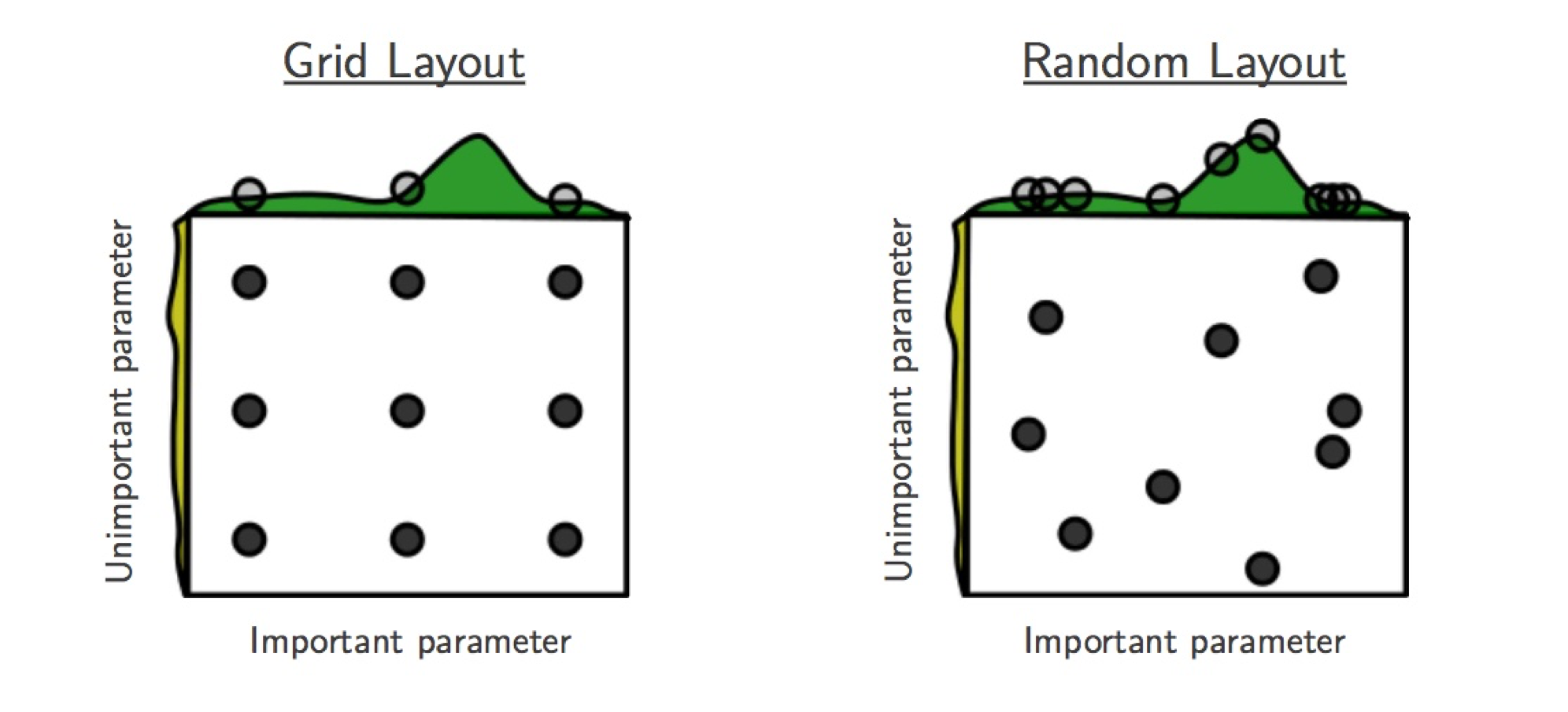
For grid search, we place a grid on each hyperparameter range, which is
uniformly or log-uniformly spaced. The product of these grids determines the
sequence, which can be traversed in regular and random ordering. An obvious
drawback of grid search is that the size of this sequence is exponential in the
number of hyperparameters. Simple “nested loop” implementations are
particularly problematic: if they are stopped early, HPs in outer loops are
sampled much worse than those in inner loops. As seen in the figure above,
grid search is particularly inefficient if some HPs are more important for the
objective values than others. For all of these reasons, grid search is not a
recommended baseline for HPO, unless very few parameters have to be tuned.
Nevertheless, Syne provides an implementation in
GridSearcher.
In random search, the sequence of configurations is chosen by independent sampling. In the simple case of interest here, each value in a configuration is chosen by sampling independently from the hyperparameter domain. Recall our search space:
from syne_tune.config_space import randint, uniform, loguniform


# Configuration space (or search space)
config_space = {
    "n_units_1": randint(4, 1024),
    "n_units_2": randint(4, 1024),
    "batch_size": randint(8, 128),
    "dropout_1": uniform(0, 0.99),
    "dropout_2": uniform(0, 0.99),
    "learning_rate": loguniform(1e-6, 1),
    "weight_decay": loguniform(1e-8, 1),
}
Here, n_units_1 is sampled uniformly from 4,...,1024, while
learning_rate is sampled log-uniformly from [1e-6, 1] (i.e., it is
exp(u), where u is sampled uniformly in [-6 log(10), 0]). As seen
in figure above, random search in general does better than grid search when
some HPs are more important than others.
Launcher Script for Random Search
Here is the launcher script we will use throughout this tutorial in order to run HPO experiments.
import logging
from argparse import ArgumentParser
from pathlib import Path

from syne_tune.backend import LocalBackend
from syne_tune.optimizer.legacy_baselines import (
    RandomSearch,
    BayesianOptimization,
    ASHA,
    MOBSTER,
)
from syne_tune import Tuner, StoppingCriterion
from syne_tune.config_space import randint, uniform, loguniform


# Configuration space (or search space)
config_space = {
    "n_units_1": randint(4, 1024),
    "n_units_2": randint(4, 1024),
    "batch_size": randint(8, 128),
    "dropout_1": uniform(0, 0.99),
    "dropout_2": uniform(0, 0.99),
    "learning_rate": loguniform(1e-6, 1),
    "weight_decay": loguniform(1e-8, 1),
}


if __name__ == "__main__":
    logging.getLogger().setLevel(logging.INFO)
    # [1]
    parser = ArgumentParser()
    parser.add_argument(
        "--method",
        type=str,
        choices=(
            "RS",
            "BO",
            "ASHA-STOP",
            "ASHA-PROM",
            "MOBSTER-STOP",
            "MOBSTER-PROM",
        ),
        default="RS",
    )
    parser.add_argument(
        "--random_seed",
        type=int,
        default=31415927,
    )
    parser.add_argument(
        "--n_workers",
        type=int,
        default=4,
    )
    parser.add_argument(
        "--max_wallclock_time",
        type=int,
        default=3 * 3600,
    )
    parser.add_argument(
        "--experiment_tag",
        type=str,
        default="basic-tutorial",
    )
    args, _ = parser.parse_known_args()

    # Here, we specify the training script we want to tune
    # - `mode` and `metric` must match what is reported in the training script
    # - Metrics need to be reported after each epoch, `resource_attr` must match
    #   what is reported in the training script
    if args.method in ("RS", "BO"):
        train_file = "traincode_report_end.py"
    elif args.method.endswith("STOP"):
        train_file = "traincode_report_eachepoch.py"
    else:
        train_file = "traincode_report_withcheckpointing.py"
    entry_point = Path(__file__).parent / train_file
    max_resource_level = 81  # Maximum number of training epochs
    mode = "max"
    metric = "accuracy"
    resource_attr = "epoch"
    max_resource_attr = "epochs"

    # Additional fixed parameters  [2]
    config_space.update(
        {
            max_resource_attr: max_resource_level,
            "dataset_path": "./",
        }
    )

    # Local backend: Responsible for scheduling trials  [3]
    # The local backend runs trials as sub-processes on a single instance
    trial_backend = LocalBackend(entry_point=str(entry_point))

    # Scheduler: Depends on `args.method`  [4]
    scheduler = None
    # Common scheduler kwargs
    method_kwargs = dict(
        metric=metric,
        mode=mode,
        random_seed=args.random_seed,
        max_resource_attr=max_resource_attr,
        search_options={"num_init_random": args.n_workers + 2},
    )
    sch_type = "promotion" if args.method.endswith("PROM") else "stopping"
    if args.method == "RS":
        scheduler = RandomSearch(config_space, **method_kwargs)
    elif args.method == "BO":
        scheduler = BayesianOptimization(config_space, **method_kwargs)
    else:
        # Multi-fidelity method
        method_kwargs["resource_attr"] = resource_attr
        if args.method.startswith("ASHA"):
            scheduler = ASHA(config_space, type=sch_type, **method_kwargs)
        elif args.method.startswith("MOBSTER"):
            scheduler = MOBSTER(config_space, type=sch_type, **method_kwargs)
        else:
            raise NotImplementedError(args.method)

    # Stopping criterion: We stop after `args.max_wallclock_time` seconds
    # [5]
    stop_criterion = StoppingCriterion(max_wallclock_time=args.max_wallclock_time)

    tuner = Tuner(
        trial_backend=trial_backend,
        scheduler=scheduler,
        stop_criterion=stop_criterion,
        n_workers=args.n_workers,
        tuner_name=args.experiment_tag,
        metadata={
            "seed": args.random_seed,
            "algorithm": args.method,
            "tag": args.experiment_tag,
        },
    )

    tuner.run()
Random search is obtained by calling this script with --method RS.
Let us walk through the script, keeping this special case in mind:
[1] The script comes with command line arguments:
methodselects the HPO method (random search being given byRS),n_workersthe number of evaluations which can be done in parallel,max_wallclock_timethe duration of the experiment, and results are stored under the tagexperiment_tag[2] Recall that apart from the 7 hyperparameters, our training script needs two additional parameters, which are fixed throughout the experiment. In particular, we need to specify the number of epochs to train for in
epochs. We set this value tomax_resource_level = 81. Here, “resource” is a more general concept than “epoch”, but for most of this tutorial, they can be considered to be the same. We need to extendconfig_spaceby these two additional parameters.[3] Next, we need to choose a backend, which specifies how Syne Tune should execute our training jobs (also called trials). The simplest choice is the local backend, which runs trials as sub-processes on a single instance.
[4] Most important, we need to choose a scheduler, which is how HPO algorithms are referred to in Syne Tune. A scheduler needs to suggest configurations for new trials, and also to make scheduling decisions about running trials. Most schedulers supported in Syne Tune can be imported from
syne_tune.optimizer.baselines. In our example, we useRandomSearch, see alsoRandomSearcher.Schedulers need to know how the target metric is referred to in the
reportcall of the training script (metric), and whether this criterion is to be minimized or maximized (mode). If its decisions are randomized,random_seedcontrols this random sampling.[5] Finally, we need to specify a stopping criterion. In our example, we run random search for
max_wallclock_timeseconds, the default being 3 hours.StoppingCriterioncan also use other attributes, such asmax_num_trials_startedormax_num_trials_completed. If several attributes are used, you get the or combination.Everything comes together in the
Tuner. Here, we can also specifyn_workers, the number of workers. This is the maximum number of trials which are run concurrently. For the local backend, concurrent trials share the resources of a single instance (e.g., CPU cores or GPUs), so the effective number of workers is limited in this way. To ensure you really usen_workersworkers, make sure to pick an instance type which caters for your needs (e.g., no less thann_workersGPUs or CPU cores), and also make sure your training script does not grab all the resources. Finally,tuner.run()starts the HPO experiment.
Results for Random Search
|
|---|
Results for Random Search |
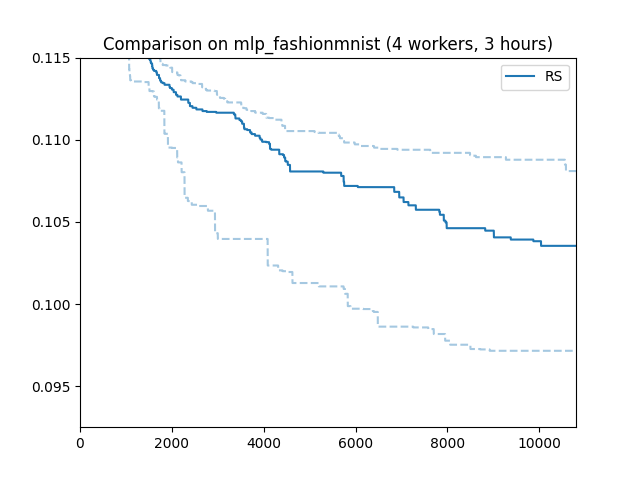
Here is how random search performs on our running example. The x axis is wall-clock time, the y axis best validation error attained until then. Such “tuning curves” are among the best ways to compare different HPO methods, as they display the most relevant information, without hiding overheads due to synchronization requirements or decision-making.
We ran random search with 4 workers (n_workers = 4) for 3 hours. In fact,
we repeated the experiments 50 times with different random seeds. The solid
line shows the median, the dashed lines the 25 and 75 percentiles. An important
take-away message is that HPO performance can vary substantially when repeated
randomly, especially when the experiment is stopped rather early. When
comparing methods, it is therefore important to run enough random repeats and
use appropriate statistical techniques which acknowledge the inherent random
fluctuations.
Note
In order to learn more about how to launch long-running HPO experiments many times in parallel on SageMaker, please have a look at this tutorial.
Recommendations
One important parameter of
RandomSearcher (and the
other schedulers we use in this tutorial) we did not use is
points_to_evaluate, which allows specifying initial configurations to
suggest first. For example:
first_config = dict(
    n_units_1=128,
    n_units_2=128,
    batch_size=64,
    dropout_1=0.5,
    dropout_2=0.5,
    learning_rate=1e-3,
    weight_decay=0.01,
)

scheduler = RandomSearch(
    config_space,
    metric=metric,
    mode=mode,
    random_seed=random_seed,
    points_to_evaluate=[first_config],
)
Here, first_config is the first configuration to be suggested, while
subsequent ones are drawn at random. If the model you would like to tune comes
with some recommended defaults, you should use them in points_to_evaluate,
in order to give random search a head start. In fact, points_to_evaluate
can contain more than one initial configurations, which are then suggested in
the order given there.
Note
Configurations in points_to_evaluate need not be completely specified.
If so, missing values are imputed by a mid-point rule. In fact, the default
for points_to_evaluate is [dict()], namely one configuration where
all values are selected by the mid-point rule. If you want to run pure
random search from the start (which is not recommended), you need to set
points_to_evaluate=[]. Details are provided
here.